> ## Documentation Index
> Fetch the complete documentation index at: https://cubed3-codex-cub-3667-eval-cli.mintlify.site/llms.txt
> Use this file to discover all available pages before exploring further.
# Evals
> Benchmark your agent's answers against a known-correct ground truth and track accuracy across data-model and agent changes.
Evals let you benchmark your agent's answers against a known-correct ground
truth, on any branch. You author a set of questions, each with the SQL or
[certified query](/admin/ai/certified-queries) that represents the right
answer, run your agent against them, and get a per-question pass/fail plus an
accuracy score for the run — so you can see, objectively, whether a data-model
or agent change made the agent better or worse.
You'll find evals in the model IDE under the **Evals** tab, with two
sub-tabs: **Evals** (runs) and **Questions** (the benchmark set).
 ## Concepts
| Term | What it is |
| -------------- | ------------------------------------------------------------------------------------------------------------------------------------------------------- |
| **Question** | A natural-language question plus its **ground truth** (the correct answer, as SQL or a certified-query reference). Authored as code in your data model. |
| **Eval (run)** | One execution of the agent against the question set — the whole set, or a single question file — on a specific branch and agent. |
| **Result** | The agent's answer to a single question in a run, graded against that question's ground truth. |
| **Accuracy** | `passed / total` for a run, shown as `NN% (passed/total)`. |
## Authoring benchmark questions
Questions live in your [data model repository](/admin/ai#agent-configuration),
versioned and branched like the rest of it. You can keep them in a single
top-level `agents/eval_questions.yml` file — the simplest place to start — or
split them across any number of `agents/eval_questions/*.yml` files as your set
grows. The parser picks up both and merges every file's `eval_questions` list
into one set, so you can move from one file to many at any time without changing
anything else. A run can also be scoped to a single file (see
[Running an eval](#running-an-eval)).
Each file has a top-level `eval_questions` list. A question needs a unique
`name`, a `question`, and exactly one ground truth: a `certifiedQuery`
reference **or** inline `sql`.
```yaml theme={"dark"}
# agents/eval_questions.yml
eval_questions:
- name: revenue_by_quarter
question: What was our revenue by quarter over the last two years?
certifiedQuery: revenue_by_quarter # reference an existing certified query by name
- name: arr_last_4_years
question: What was our ARR over the last 4 years?
sql: | # ...or inline SQL ground truth
SELECT date_trunc('year', created_at) AS year, SUM(arr) AS arr
FROM subscriptions GROUP BY 1 ORDER BY 1
```
* `certifiedQuery` references a [certified query](/admin/ai/certified-queries)
by name. Define it under `agents/certified_queries/` (or via **Certify this
query** in chat). A reference that doesn't resolve to an existing certified
query is flagged as a validation error.
* `sql` is inline ground-truth SQL, run through the same Cube SQL API the agent
uses (so `MEASURE(...)` and friends work).
* Omitting both — or setting both — is a validation error.
* An optional top-level `space` key scopes a file's questions to a named space
(defaults to `auto`). Question names are unique per space.
The **Questions** tab is a read-only view of these files — its **File**
column shows which file defined each question. To add or edit questions, edit
the YAML in the IDE — there's no in-product question editor yet.
## Running an eval
On the **Evals** tab, click **Run eval** and choose:
* **Branch** — which branch's data model and agent configuration to run
against. Defaults to the active branch.
* **Questions** — **All questions** (the default) or a single question file,
to run only that file's questions. The selector appears only when the
selected branch's questions come from more than one file, and each file
option shows how many questions it holds. Switching branches resets it to
**All questions**.
* **Agent** — `auto` (the implicit auto-agent) or a configured agent name.
The run starts immediately and you can close the dialog — it executes in the
background. The run list shows live progress and then the outcome:
| Column | Meaning |
| -------------------- | ---------------------------------------------------------------------------------------------------------------------------------------------------------- |
| **Eval run** | When the run was created. |
| **Environment** | Where it ran — **dev** (your personal dev-mode branch, shown as "*Name* Dev Mode"), **staging**, or **prod** (the deploy branch, e.g. `master` or `main`). |
| **Agent** | The agent used. |
| **Execution status** | Running, Completed, or Failed. |
| **Questions** | The file the run was scoped to, or **All questions**. |
| **Accuracy** | `NN% (passed/total)`. |
| **Created by** | Who triggered the run. |
| **Last updated** | When it finished. |
### Run evals from CI
You can gate a pull request with either the Cube CLI or the public Platform
API. In both cases, store the tenant URL and deployment ID as repository
variables, store the API key as a secret, and pass the branch under review.
The API key needs `SchemaUpdate` access to start a run and either `SchemaRead`
or `SchemaUpdate` access to poll it and read its results.
This capability is currently in preview. Contact Cube support to activate it
for your account.
#### With the Cube CLI
Set `CUBE_CLI_VERSION` to the Cube CLI release you have tested, then install
that exact version in the job:
```yaml theme={"dark"}
env:
CUBE_API_URL: ${{ vars.CUBE_API_URL }}
CUBE_API_KEY: ${{ secrets.CUBE_API_KEY }}
DEPLOYMENT_ID: ${{ vars.CUBE_DEPLOYMENT_ID }}
CUBE_BRANCH: ${{ github.head_ref || github.ref_name }}
steps:
- name: Install Cube CLI
env:
CUBE_VERSION: ${{ vars.CUBE_CLI_VERSION }}
shell: bash
run: |
set -euo pipefail
test -n "$CUBE_VERSION"
curl -fsSL https://raw.githubusercontent.com/cube-js/cube/master/install-cli.sh | sh
- name: Run Cube agent evals
shell: bash
timeout-minutes: 35
run: |
set -euo pipefail
trap 'if [[ -f eval.json && ! -s eval.json ]]; then rm -f eval.json; fi' EXIT
cube evals run "$DEPLOYMENT_ID" \
--branch "$CUBE_BRANCH" \
--wait \
--timeout 30m \
--json > eval.json
- name: Upload eval result
if: always()
uses: actions/upload-artifact@v4
with:
name: cube-eval
path: eval.json
if-no-files-found: ignore
```
The command waits for completion and exits non-zero when the eval run fails,
when it produces no graded questions, or when any question has a verdict other
than `pass`. It also fails closed if the API does not confirm a complete result
set. When a complete result set is returned, the command writes `eval.json`
before exiting, including on a failed verdict. If results cannot be verified,
the step log explains why and the empty output file is removed, so no empty
artifact is uploaded. Add `--agent NAME` to test a configured agent or
`--file eval_questions/revenue.yml` to limit the run to one question file. Pass
`--json` for a machine-readable document containing both the terminal run and
its per-question results when the result set is complete.
#### With the Platform API
If you do not want to install the CLI, call the same public endpoints directly.
This example does not retry the `POST`, because repeating a non-idempotent start
request after an ambiguous network failure could create another run. It bounds
every `GET`, retries transient read failures, and applies the same fail-closed
checks as the CLI. Because reads are idempotent, it retries connection resets
too; a permanent read error such as `401` will also be retried four times before
the job fails. Each read writes to a file so curl can discard a partial response
before retrying.
```yaml theme={"dark"}
env:
CUBE_API_URL: ${{ vars.CUBE_API_URL }}
CUBE_API_KEY: ${{ secrets.CUBE_API_KEY }}
DEPLOYMENT_ID: ${{ vars.CUBE_DEPLOYMENT_ID }}
CUBE_BRANCH: ${{ github.head_ref || github.ref_name }}
steps:
- name: Run Cube agent evals through the Platform API
shell: bash
timeout-minutes: 35
run: |
set -euo pipefail
api="${CUBE_API_URL%/}/api/v1/deployments/$DEPLOYMENT_ID/evaluations"
auth=(-H "Authorization: Api-Key $CUBE_API_KEY")
reads=(
curl --fail --silent --show-error
--connect-timeout 10 --max-time 30
--retry 4 --retry-delay 2 --retry-all-errors
"${auth[@]}"
)
started=$(
jq -cn --arg branch "$CUBE_BRANCH" '{branchName: $branch}' |
curl --fail-with-body --silent --show-error \
--connect-timeout 10 --max-time 30 \
"${auth[@]}" -H 'Content-Type: application/json' \
--data-binary @- "$api"
)
evaluation_id=$(jq -er '.id | select(type == "number")' <<<"$started")
deadline=$((SECONDS + 1800))
last_status=
while :; do
if (( SECONDS >= deadline )); then
echo "Timed out waiting for eval run $evaluation_id" >&2
exit 1
fi
"${reads[@]}" --output run.json "$api/$evaluation_id"
status=$(jq -r '.status | if type == "string" then ascii_downcase else "" end' run.json)
if [[ "$status" != "$last_status" ]]; then
echo "Eval run $evaluation_id: $status"
last_status=$status
fi
case "$status" in
completed|failed) break ;;
*) sleep 5 ;;
esac
done
"${reads[@]}" --output results.json "$api/$evaluation_id/results"
jq -n --slurpfile evalRun run.json --slurpfile results results.json \
'{evalRun: $evalRun[0], results: $results[0]}' > eval.json
jq . eval.json
if ! jq -e '
(.evalRun.status | ascii_downcase) == "completed" and
(.results.items | type) == "array" and
(.results.items | length) > 0 and
.results.pageInfo.hasNextPage == false and
all(.results.items[]; (.verdict // "" | ascii_downcase) == "pass")
' eval.json > /dev/null; then
echo "The eval run failed, was incomplete, or did not pass every question" >&2
exit 1
fi
- name: Upload eval result
if: always()
uses: actions/upload-artifact@v4
with:
name: cube-eval
path: eval.json
if-no-files-found: ignore
```
The `POST` body also accepts `agentName` and `questionFile`. Omitting the
pagination parameters on the results request returns the complete result set;
if `pageInfo.hasNextPage` is anything other than `false`, do not use that page
as a CI verdict.
Both recipes require every selected question to return `pass`. A `review`
verdict, including one caused by missing ground truth, fails the CI gate. Keep
questions intended for manual review in a separate file, then use CLI `--file`
or API `questionFile` to run an automatically gradable file in CI.
## Reading the results
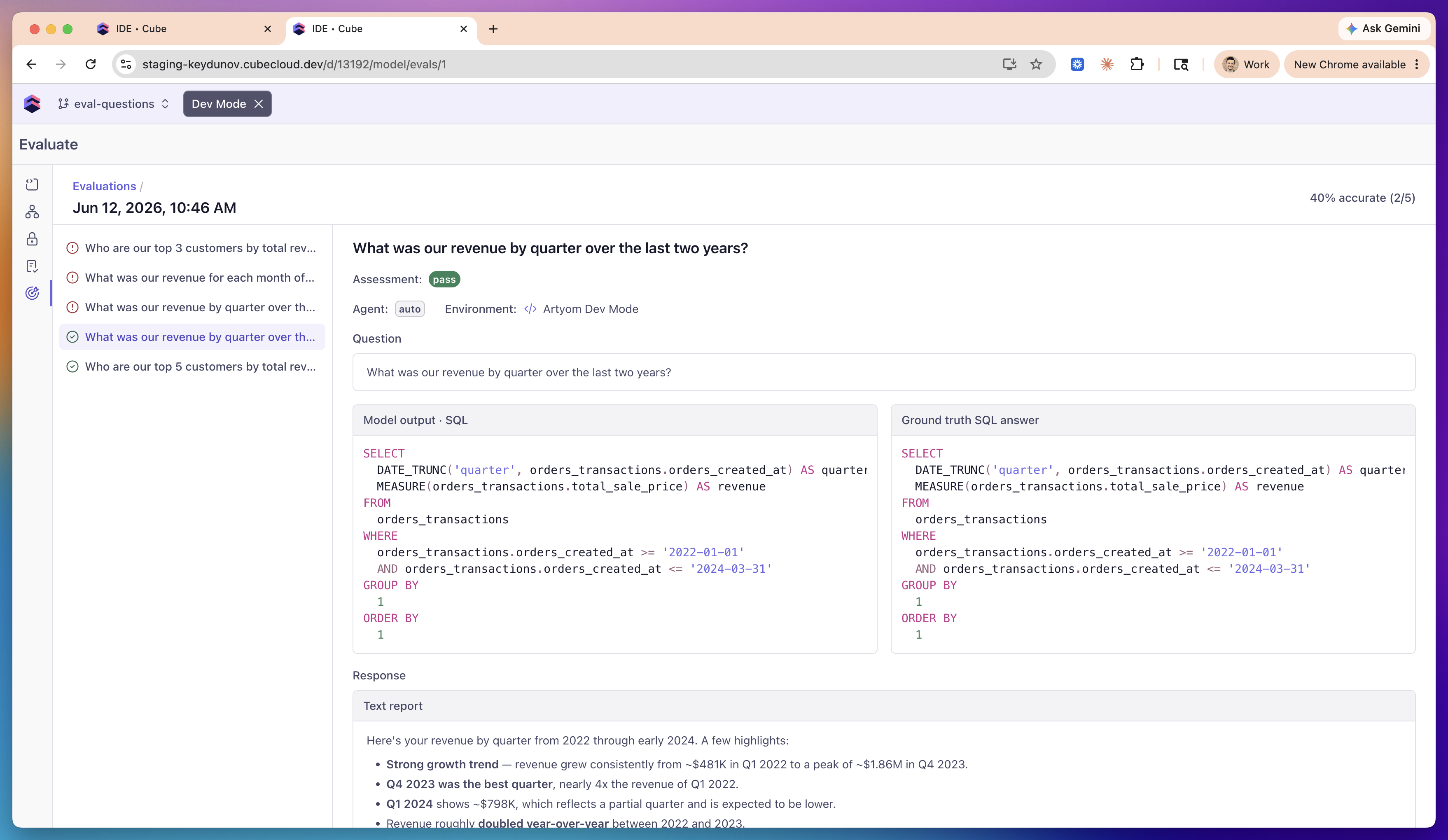
Open a run to see per-question results: the question list on the left, with a
pass/fail icon for each, and the selected question's detail on the right. The
run's scope is repeated in the header, next to **Questions**.
* **Assessment** — `pass`, `fail`, `review`, or `error`.
* **Score reason** — when a question doesn't pass, a tag categorizing why:
**Row count mismatch**, **Missing columns**, **Value mismatch**,
**Unexpected rows**, **Query error**, **Ground truth query failed**,
**Ground truth not found**, or **Agent error**.
* **Failure analysis** — a plain-English explanation, e.g. *"The agent
returned 3 rows, but the ground truth has 5 rows."*
* **Model output · SQL** vs. **Ground truth SQL answer** — the agent's query
side-by-side with the ground truth, so you can spot the difference.
* **Response** — the agent's full text answer, rendered as Markdown.
## How grading works
Grading is execution-based, not text-based — the same approach used by
industry text-to-SQL benchmarks such as BIRD and Spider 2.0. The agent's SQL
and the ground-truth SQL are both executed, and their result sets are
compared. So an answer that's worded or written differently but produces the
same data still passes.
The comparison is:
* **Sort-invariant** — row order never matters.
* **Numeric-tolerant** — values are compared to 4 significant figures, so
float/representation noise (`6646` vs. `6646.0`) doesn't fail.
* **Column-name-agnostic and lenient on extra columns** — each ground-truth
column must be reproduced by some agent column, matched by its values, so
`revenue` vs. `total` aliases don't matter. Extra columns the agent adds are
ignored.
* **No standalone row-count gate** — row count falls out of the comparison: a
"top 5" question is enforced because the golden result has exactly 5 rows.
Verdicts:
| Verdict | When |
| ---------- | ----------------------------------------------------------------------------------------------------------------------- |
| **pass** | The agent's result set matches the ground truth. |
| **fail** | It ran but the result set doesn't match (see the score reason). |
| **review** | Nothing to compare automatically — the question has no ground truth, or the agent didn't run a query. Compare manually. |
| **error** | The agent run failed, the ground-truth query failed, or a referenced certified query wasn't found. |
## Limitations
* Questions are authored as code only; the **Questions** tab is read-only.
* Very large question sets can be slow to run in full. To iterate faster, split
them across `agents/eval_questions/*.yml` files and scope the run to one file.
* Grading is execution-based on the result set; it does not semantically judge
prose answers.
## Concepts
| Term | What it is |
| -------------- | ------------------------------------------------------------------------------------------------------------------------------------------------------- |
| **Question** | A natural-language question plus its **ground truth** (the correct answer, as SQL or a certified-query reference). Authored as code in your data model. |
| **Eval (run)** | One execution of the agent against the question set — the whole set, or a single question file — on a specific branch and agent. |
| **Result** | The agent's answer to a single question in a run, graded against that question's ground truth. |
| **Accuracy** | `passed / total` for a run, shown as `NN% (passed/total)`. |
## Authoring benchmark questions
Questions live in your [data model repository](/admin/ai#agent-configuration),
versioned and branched like the rest of it. You can keep them in a single
top-level `agents/eval_questions.yml` file — the simplest place to start — or
split them across any number of `agents/eval_questions/*.yml` files as your set
grows. The parser picks up both and merges every file's `eval_questions` list
into one set, so you can move from one file to many at any time without changing
anything else. A run can also be scoped to a single file (see
[Running an eval](#running-an-eval)).
Each file has a top-level `eval_questions` list. A question needs a unique
`name`, a `question`, and exactly one ground truth: a `certifiedQuery`
reference **or** inline `sql`.
```yaml theme={"dark"}
# agents/eval_questions.yml
eval_questions:
- name: revenue_by_quarter
question: What was our revenue by quarter over the last two years?
certifiedQuery: revenue_by_quarter # reference an existing certified query by name
- name: arr_last_4_years
question: What was our ARR over the last 4 years?
sql: | # ...or inline SQL ground truth
SELECT date_trunc('year', created_at) AS year, SUM(arr) AS arr
FROM subscriptions GROUP BY 1 ORDER BY 1
```
* `certifiedQuery` references a [certified query](/admin/ai/certified-queries)
by name. Define it under `agents/certified_queries/` (or via **Certify this
query** in chat). A reference that doesn't resolve to an existing certified
query is flagged as a validation error.
* `sql` is inline ground-truth SQL, run through the same Cube SQL API the agent
uses (so `MEASURE(...)` and friends work).
* Omitting both — or setting both — is a validation error.
* An optional top-level `space` key scopes a file's questions to a named space
(defaults to `auto`). Question names are unique per space.
The **Questions** tab is a read-only view of these files — its **File**
column shows which file defined each question. To add or edit questions, edit
the YAML in the IDE — there's no in-product question editor yet.
## Running an eval
On the **Evals** tab, click **Run eval** and choose:
* **Branch** — which branch's data model and agent configuration to run
against. Defaults to the active branch.
* **Questions** — **All questions** (the default) or a single question file,
to run only that file's questions. The selector appears only when the
selected branch's questions come from more than one file, and each file
option shows how many questions it holds. Switching branches resets it to
**All questions**.
* **Agent** — `auto` (the implicit auto-agent) or a configured agent name.
The run starts immediately and you can close the dialog — it executes in the
background. The run list shows live progress and then the outcome:
| Column | Meaning |
| -------------------- | ---------------------------------------------------------------------------------------------------------------------------------------------------------- |
| **Eval run** | When the run was created. |
| **Environment** | Where it ran — **dev** (your personal dev-mode branch, shown as "*Name* Dev Mode"), **staging**, or **prod** (the deploy branch, e.g. `master` or `main`). |
| **Agent** | The agent used. |
| **Execution status** | Running, Completed, or Failed. |
| **Questions** | The file the run was scoped to, or **All questions**. |
| **Accuracy** | `NN% (passed/total)`. |
| **Created by** | Who triggered the run. |
| **Last updated** | When it finished. |
### Run evals from CI
You can gate a pull request with either the Cube CLI or the public Platform
API. In both cases, store the tenant URL and deployment ID as repository
variables, store the API key as a secret, and pass the branch under review.
The API key needs `SchemaUpdate` access to start a run and either `SchemaRead`
or `SchemaUpdate` access to poll it and read its results.
This capability is currently in preview. Contact Cube support to activate it
for your account.
#### With the Cube CLI
Set `CUBE_CLI_VERSION` to the Cube CLI release you have tested, then install
that exact version in the job:
```yaml theme={"dark"}
env:
CUBE_API_URL: ${{ vars.CUBE_API_URL }}
CUBE_API_KEY: ${{ secrets.CUBE_API_KEY }}
DEPLOYMENT_ID: ${{ vars.CUBE_DEPLOYMENT_ID }}
CUBE_BRANCH: ${{ github.head_ref || github.ref_name }}
steps:
- name: Install Cube CLI
env:
CUBE_VERSION: ${{ vars.CUBE_CLI_VERSION }}
shell: bash
run: |
set -euo pipefail
test -n "$CUBE_VERSION"
curl -fsSL https://raw.githubusercontent.com/cube-js/cube/master/install-cli.sh | sh
- name: Run Cube agent evals
shell: bash
timeout-minutes: 35
run: |
set -euo pipefail
trap 'if [[ -f eval.json && ! -s eval.json ]]; then rm -f eval.json; fi' EXIT
cube evals run "$DEPLOYMENT_ID" \
--branch "$CUBE_BRANCH" \
--wait \
--timeout 30m \
--json > eval.json
- name: Upload eval result
if: always()
uses: actions/upload-artifact@v4
with:
name: cube-eval
path: eval.json
if-no-files-found: ignore
```
The command waits for completion and exits non-zero when the eval run fails,
when it produces no graded questions, or when any question has a verdict other
than `pass`. It also fails closed if the API does not confirm a complete result
set. When a complete result set is returned, the command writes `eval.json`
before exiting, including on a failed verdict. If results cannot be verified,
the step log explains why and the empty output file is removed, so no empty
artifact is uploaded. Add `--agent NAME` to test a configured agent or
`--file eval_questions/revenue.yml` to limit the run to one question file. Pass
`--json` for a machine-readable document containing both the terminal run and
its per-question results when the result set is complete.
#### With the Platform API
If you do not want to install the CLI, call the same public endpoints directly.
This example does not retry the `POST`, because repeating a non-idempotent start
request after an ambiguous network failure could create another run. It bounds
every `GET`, retries transient read failures, and applies the same fail-closed
checks as the CLI. Because reads are idempotent, it retries connection resets
too; a permanent read error such as `401` will also be retried four times before
the job fails. Each read writes to a file so curl can discard a partial response
before retrying.
```yaml theme={"dark"}
env:
CUBE_API_URL: ${{ vars.CUBE_API_URL }}
CUBE_API_KEY: ${{ secrets.CUBE_API_KEY }}
DEPLOYMENT_ID: ${{ vars.CUBE_DEPLOYMENT_ID }}
CUBE_BRANCH: ${{ github.head_ref || github.ref_name }}
steps:
- name: Run Cube agent evals through the Platform API
shell: bash
timeout-minutes: 35
run: |
set -euo pipefail
api="${CUBE_API_URL%/}/api/v1/deployments/$DEPLOYMENT_ID/evaluations"
auth=(-H "Authorization: Api-Key $CUBE_API_KEY")
reads=(
curl --fail --silent --show-error
--connect-timeout 10 --max-time 30
--retry 4 --retry-delay 2 --retry-all-errors
"${auth[@]}"
)
started=$(
jq -cn --arg branch "$CUBE_BRANCH" '{branchName: $branch}' |
curl --fail-with-body --silent --show-error \
--connect-timeout 10 --max-time 30 \
"${auth[@]}" -H 'Content-Type: application/json' \
--data-binary @- "$api"
)
evaluation_id=$(jq -er '.id | select(type == "number")' <<<"$started")
deadline=$((SECONDS + 1800))
last_status=
while :; do
if (( SECONDS >= deadline )); then
echo "Timed out waiting for eval run $evaluation_id" >&2
exit 1
fi
"${reads[@]}" --output run.json "$api/$evaluation_id"
status=$(jq -r '.status | if type == "string" then ascii_downcase else "" end' run.json)
if [[ "$status" != "$last_status" ]]; then
echo "Eval run $evaluation_id: $status"
last_status=$status
fi
case "$status" in
completed|failed) break ;;
*) sleep 5 ;;
esac
done
"${reads[@]}" --output results.json "$api/$evaluation_id/results"
jq -n --slurpfile evalRun run.json --slurpfile results results.json \
'{evalRun: $evalRun[0], results: $results[0]}' > eval.json
jq . eval.json
if ! jq -e '
(.evalRun.status | ascii_downcase) == "completed" and
(.results.items | type) == "array" and
(.results.items | length) > 0 and
.results.pageInfo.hasNextPage == false and
all(.results.items[]; (.verdict // "" | ascii_downcase) == "pass")
' eval.json > /dev/null; then
echo "The eval run failed, was incomplete, or did not pass every question" >&2
exit 1
fi
- name: Upload eval result
if: always()
uses: actions/upload-artifact@v4
with:
name: cube-eval
path: eval.json
if-no-files-found: ignore
```
The `POST` body also accepts `agentName` and `questionFile`. Omitting the
pagination parameters on the results request returns the complete result set;
if `pageInfo.hasNextPage` is anything other than `false`, do not use that page
as a CI verdict.
Both recipes require every selected question to return `pass`. A `review`
verdict, including one caused by missing ground truth, fails the CI gate. Keep
questions intended for manual review in a separate file, then use CLI `--file`
or API `questionFile` to run an automatically gradable file in CI.
## Reading the results
Open a run to see per-question results: the question list on the left, with a
pass/fail icon for each, and the selected question's detail on the right. The
run's scope is repeated in the header, next to **Questions**.
* **Assessment** — `pass`, `fail`, `review`, or `error`.
* **Score reason** — when a question doesn't pass, a tag categorizing why:
**Row count mismatch**, **Missing columns**, **Value mismatch**,
**Unexpected rows**, **Query error**, **Ground truth query failed**,
**Ground truth not found**, or **Agent error**.
* **Failure analysis** — a plain-English explanation, e.g. *"The agent
returned 3 rows, but the ground truth has 5 rows."*
* **Model output · SQL** vs. **Ground truth SQL answer** — the agent's query
side-by-side with the ground truth, so you can spot the difference.
* **Response** — the agent's full text answer, rendered as Markdown.
## How grading works
Grading is execution-based, not text-based — the same approach used by
industry text-to-SQL benchmarks such as BIRD and Spider 2.0. The agent's SQL
and the ground-truth SQL are both executed, and their result sets are
compared. So an answer that's worded or written differently but produces the
same data still passes.
The comparison is:
* **Sort-invariant** — row order never matters.
* **Numeric-tolerant** — values are compared to 4 significant figures, so
float/representation noise (`6646` vs. `6646.0`) doesn't fail.
* **Column-name-agnostic and lenient on extra columns** — each ground-truth
column must be reproduced by some agent column, matched by its values, so
`revenue` vs. `total` aliases don't matter. Extra columns the agent adds are
ignored.
* **No standalone row-count gate** — row count falls out of the comparison: a
"top 5" question is enforced because the golden result has exactly 5 rows.
Verdicts:
| Verdict | When |
| ---------- | ----------------------------------------------------------------------------------------------------------------------- |
| **pass** | The agent's result set matches the ground truth. |
| **fail** | It ran but the result set doesn't match (see the score reason). |
| **review** | Nothing to compare automatically — the question has no ground truth, or the agent didn't run a query. Compare manually. |
| **error** | The agent run failed, the ground-truth query failed, or a referenced certified query wasn't found. |
## Limitations
* Questions are authored as code only; the **Questions** tab is read-only.
* Very large question sets can be slow to run in full. To iterate faster, split
them across `agents/eval_questions/*.yml` files and scope the run to one file.
* Grading is execution-based on the result set; it does not semantically judge
prose answers.